
How to Review Meter History
Abschnitt betitelt „How to Review Meter History“ VERFÜGBARKEIT
Berechtigung: ✓ view-meter
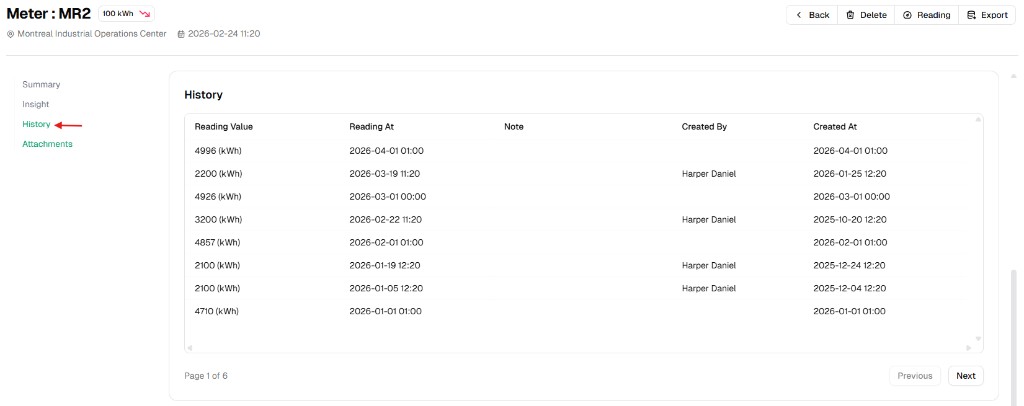
The History tab is the audit log of meter readings. It shows each reading row with context such as who created it and when.
Step 1: Open meter details
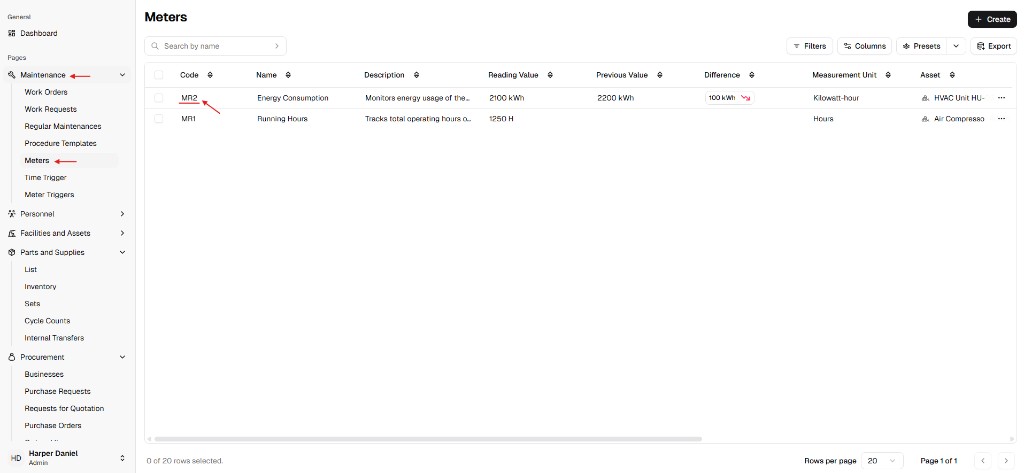
Abschnitt betitelt „Step 1: Open meter details“- Go to Maintenance → Meters.
- Click the meter Code to open the detail page.
Step 2: Open the History tab
Abschnitt betitelt „Step 2: Open the History tab“Select History in the left tab list.
Step 3: Interpret the table
Abschnitt betitelt „Step 3: Interpret the table“Common columns include:
- Reading Value
- Reading At
- Note
- Created By
- Created At
Use pagination controls to browse older pages when many records exist.