
Esta página aún no está disponible en tu idioma.
Part Types
Section titled “Part Types”About Part Types
Section titled “About Part Types”Part Types group inventory into standardized categories such as bearings, belts, filters, or electrical components. Consistent classification improves procurement accuracy, stock filtering, and spare-parts reporting.
Part Types List (+)
Section titled “Part Types List (+)”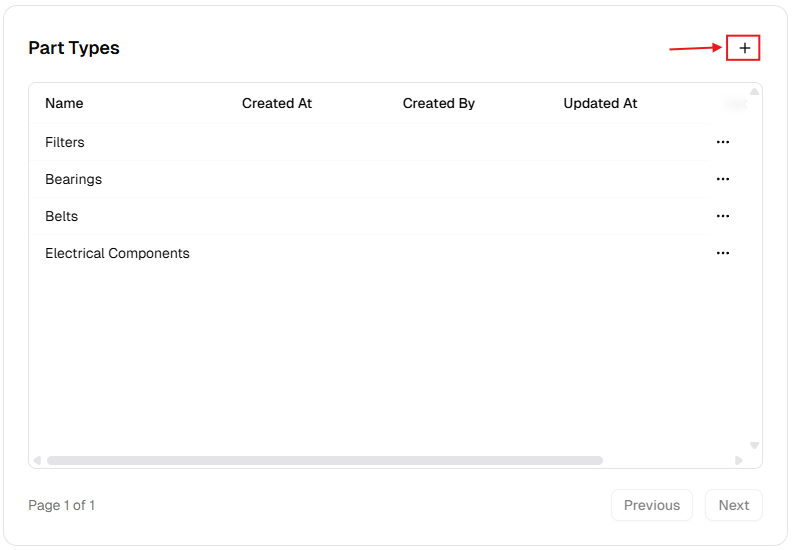
New Part Type Dialog
Section titled “New Part Type Dialog”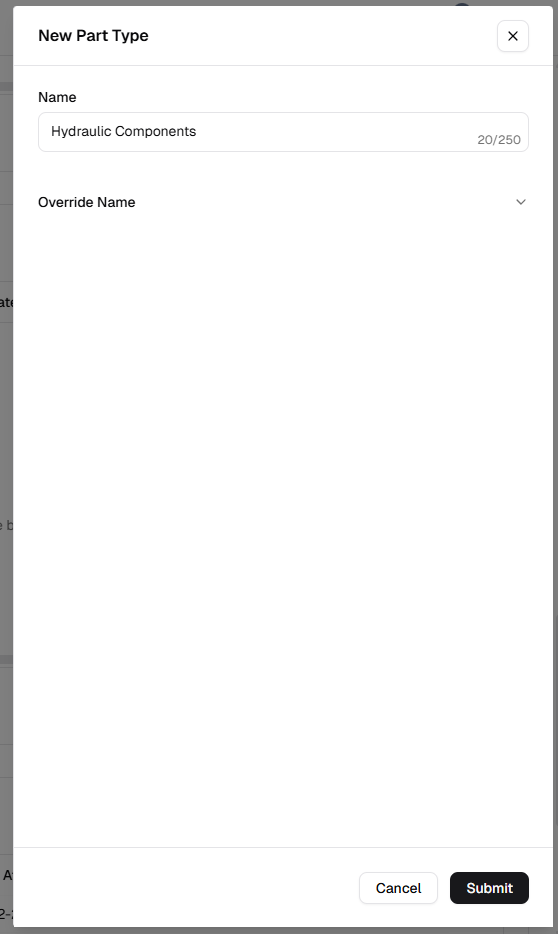
How to manage Part Types
Section titled “How to manage Part Types”Add a new part type
Section titled “Add a new part type”- Open Admin Portal → Settings → Reference Data.
- Find Part Types and click +.
- Complete the form:
| Field | Description | Required |
|---|---|---|
| Name | Category (e.g. “Bearings”). | Yes |
| Override Name | Translated label. | No |
- Click Submit.
Update an existing part type
Section titled “Update an existing part type”- More (⋯) → Edit.
- Update Name or Override Name.
- Click Update.
Delete a part type
Section titled “Delete a part type”- More (⋯) → Delete.
- Safeguard: Deletion is blocked while any part uses this type. Reassign parts first.
Verification after changes
Section titled “Verification after changes”After creating, editing, or deleting a part type:
- Confirm the Part Types table reflects your latest update.
- Verify naming consistency and remove near-duplicate categories.
- Open a part create/edit form and confirm the updated type options are available.