
Esta página aún no está disponible en tu idioma.
How to add additional costs to a purchase order
Section titled “How to add additional costs to a purchase order”Additional costs capture overhead on a Purchase Order beyond catalog line prices—for example freight, handling, or insurance. Each entry uses a category from Reference Data — Additional Costs (only types enabled For Purchase Order appear in the dropdown). Recording them here keeps the PO total spend aligned with what your budget account should absorb and leaves a clear audit trail.
Step-by-step
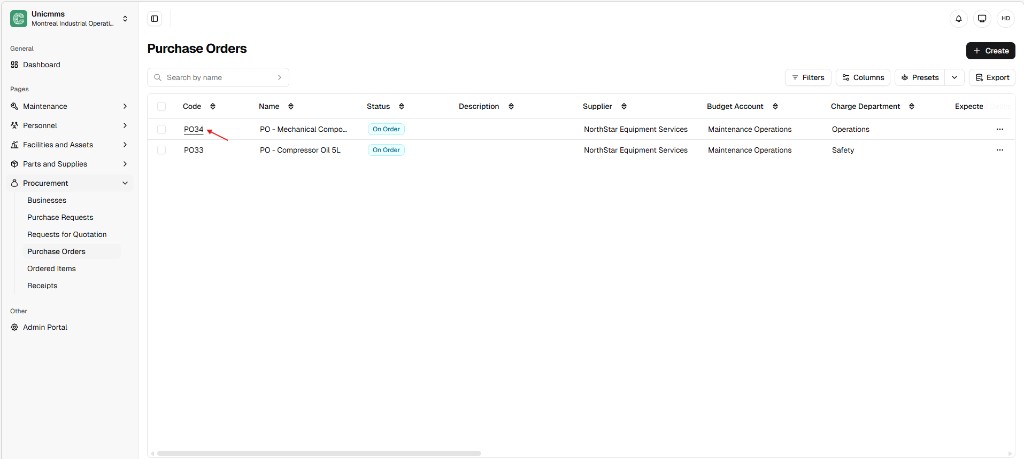
Section titled “Step-by-step”- Open the PO — Go to Procurement → Purchase Orders. In the table, click the Code hyperlink on the row (for example PO34) to open the PO detail view. This works for Draft or On order (validated) POs, depending on what your tenant allows for cost entry.
-
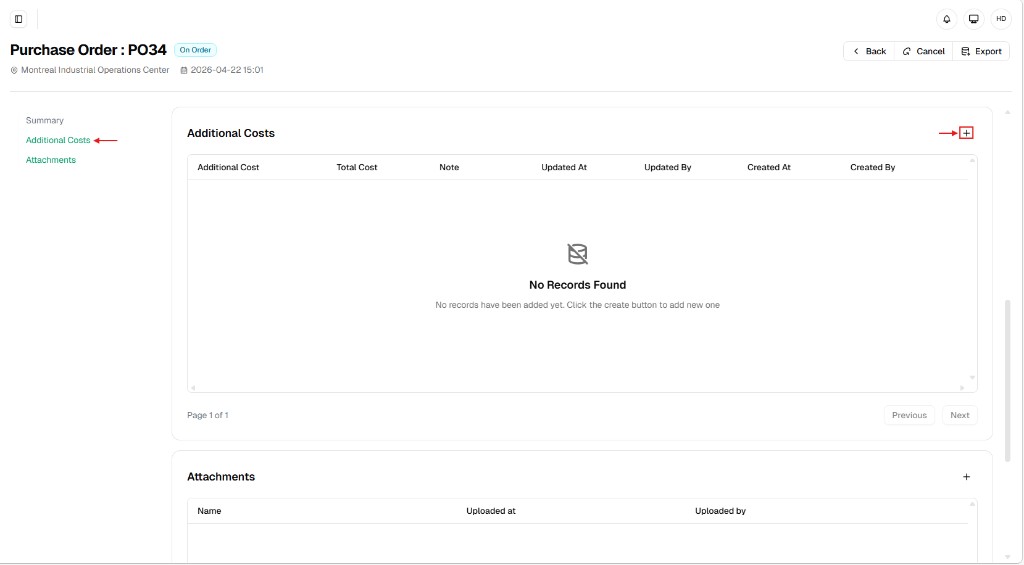
Open Additional Costs — In the left-hand summary menu, click Additional Costs (next to Summary and Attachments).
-
Add a row — Click the [+] button on the right side of the Additional Costs section header. When the grid is empty, the product shows a short empty state inviting you to use the create control.
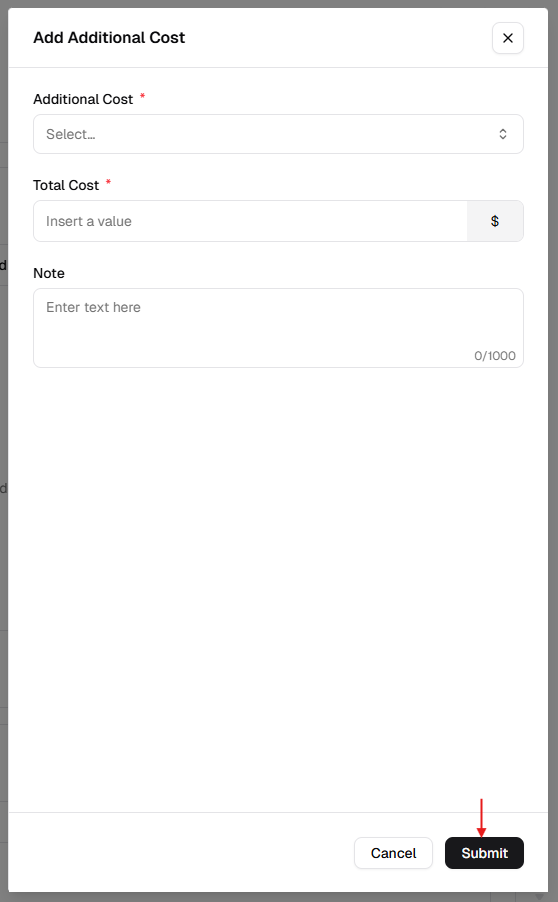
- Complete the form — In Add Additional Cost, fill the fields and click Submit (or Cancel / X to close without saving).
| Field | Description | Required? |
|---|---|---|
| Additional cost * | Category of the expense (for example Freight, Handling). Options come from Additional Costs in Reference Data. | Yes |
| Total cost * | Amount for this charge. The field typically shows your currency symbol (for example $) and rolls into PO totals. | Yes |
| Note | Internal explanation or reference (for example FedEx tracking #123). Often up to 1000 characters (counter in the field). | No |
5. Submit — Click Submit in the dialog. The new line appears in the Additional Costs grid with Created / Updated metadata.
Additional costs grid — column reference
Section titled “Additional costs grid — column reference”Once lines exist, the section table usually includes:
| Column | Description |
|---|---|
| Additional cost | The category label for the row. |
| Total cost | The stored amount for that line. |
| Note | Your optional comment or reference. |
| Updated at / Updated by | Last change time and user. |
| Created at / Created by | First save time and user. |
Operational logic and financial impact
Section titled “Operational logic and financial impact”- Budget accuracy — Additional costs are combined with Products totals so the PO reflects the full commitment. Your budget account should reflect the entire spend, not only part prices.
- Audit trail — Each line stores who entered or changed it and when, which reduces unaccounted “hidden” charges on orders.
- Flexibility — You can attach multiple additional costs to one PO (for example separate lines for shipping and installation), each with its own category, amount, and note.