
How to Use Meter Insight
Sección titulada «How to Use Meter Insight» DISPONIBILIDAD
Permiso: ✓ view-meter
The Insight tab helps you visualize meter behavior over time, so you can quickly spot abnormal increases, drops, and recurring patterns.
Step 1: Open meter details
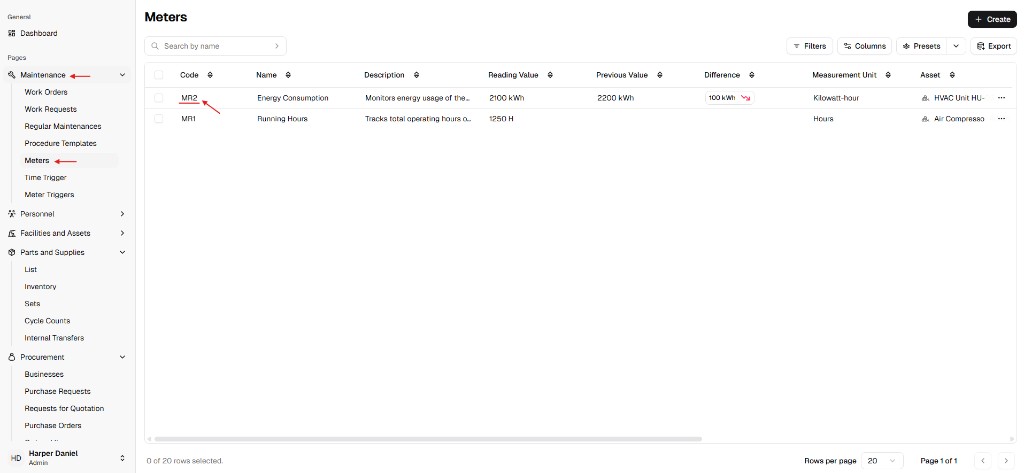
Sección titulada «Step 1: Open meter details»- Go to Maintenance → Meters.
- Click the meter Code (for example
MR2) to open the detail page.
Step 2: Open the Insight tab
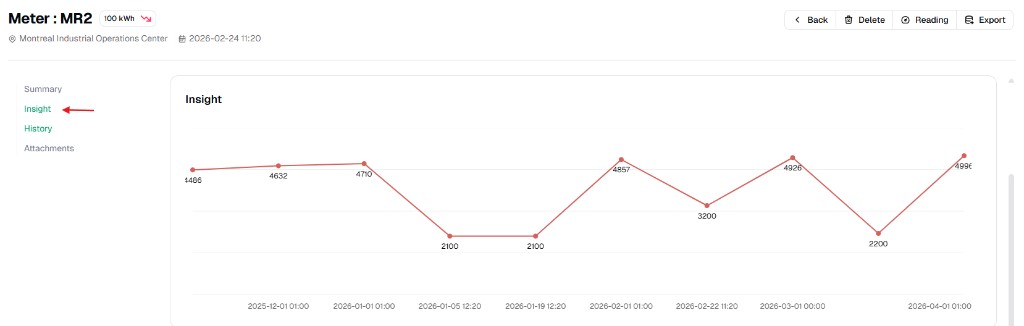
Sección titulada «Step 2: Open the Insight tab»Select Insight in the left tab list.
Step 3: Read the trend
Sección titulada «Step 3: Read the trend»Use the chart to:
- compare recent values with earlier periods,
- detect spikes/drops that may indicate operational issues,
- validate whether recent corrective actions improved the metric.