
Ce contenu n’est pas encore disponible dans votre langue.
How to Edit a Site
Section titled “How to Edit a Site”Editing a Site lets you correct an address, refine GPS coordinates, or update the description when operational reality changes—without creating a duplicate Site.
Open the Row Menu and Click Edit
Section titled “Open the Row Menu and Click Edit”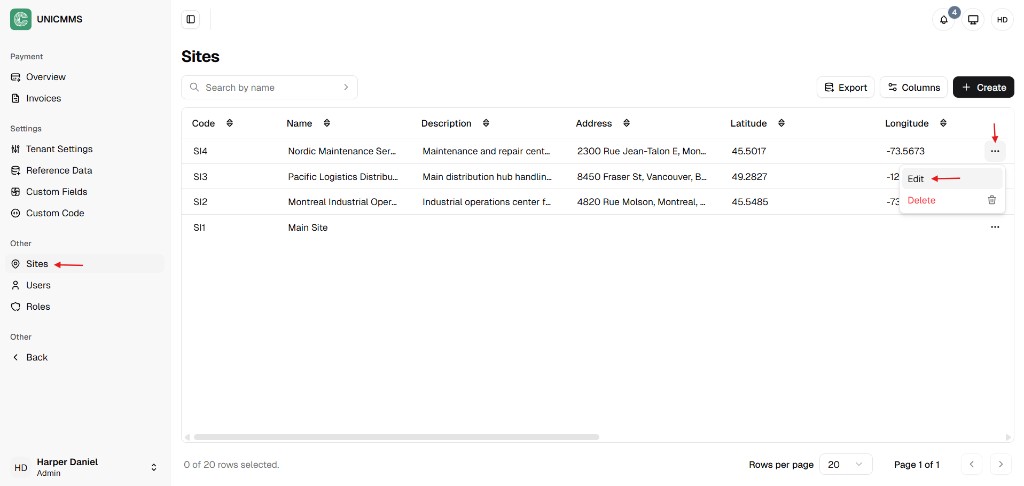
Edit Site Drawer
Section titled “Edit Site Drawer”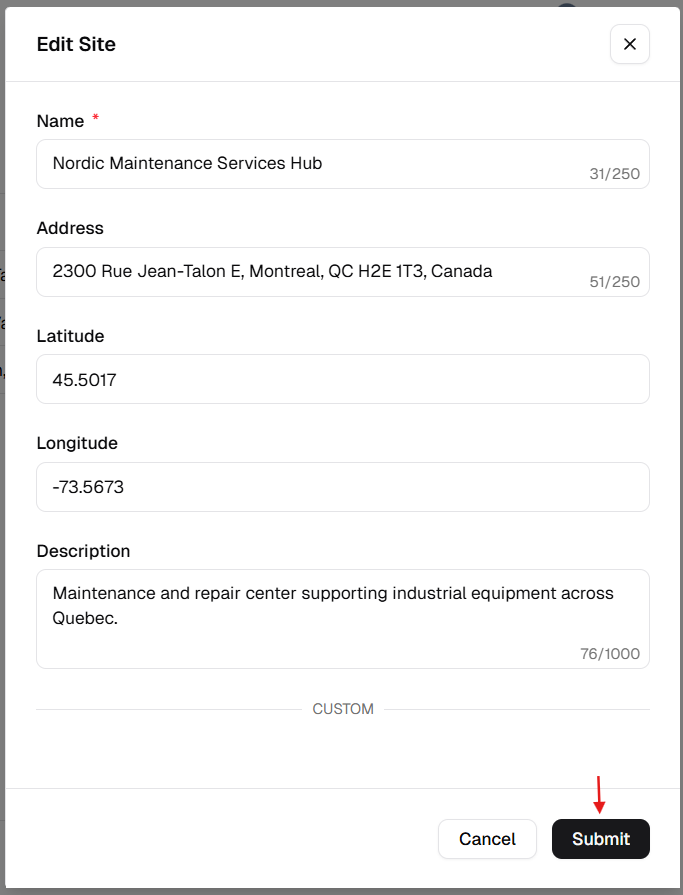
Step 1 – Access the Sites List
Section titled “Step 1 – Access the Sites List”- From the main sidebar, go to Other → Admin Portal.
- Click Sites.
Step 2 – Open the Edit Form
Section titled “Step 2 – Open the Edit Form”- Locate the Site in the list.
- Click the More (⋯) icon on that row.
- Select Edit from the menu.
Step 3 – Update Site Parameters
Section titled “Step 3 – Update Site Parameters”Adjust any fields that need to change. The same fields as on creation apply:
| Field | What to change |
|---|---|
| Name | Rename the Site if the official location name changed. |
| Address | Update street, city, or country for deliveries and records. |
| Latitude / Longitude | Refine map coordinates if the pin was wrong or the facility moved. |
| Description | Clarify the Site’s role (e.g. distribution only, manufacturing, HQ). |
Step 4 – Save Your Changes
Section titled “Step 4 – Save Your Changes”- Review the updated values.
- Click Submit at the bottom-right of the edit drawer.
Step 5 – Verify the Update
Section titled “Step 5 – Verify the Update”After saving:
- Confirm the edit drawer closes.
- Verify changed values in the Sites table.
- Use Search by name to quickly locate and re-check the updated Site.
If you do not see changes immediately, refresh the list and confirm you edited the correct row before retrying.