
Ce contenu n’est pas encore disponible dans votre langue.
How to Add a Business
Section titled “How to Add a Business”Adding a business creates a new entity in the global directory. Once saved, that record can be selected on procurement documents at every site—see Businesses (global directory) for why global sharing matters.
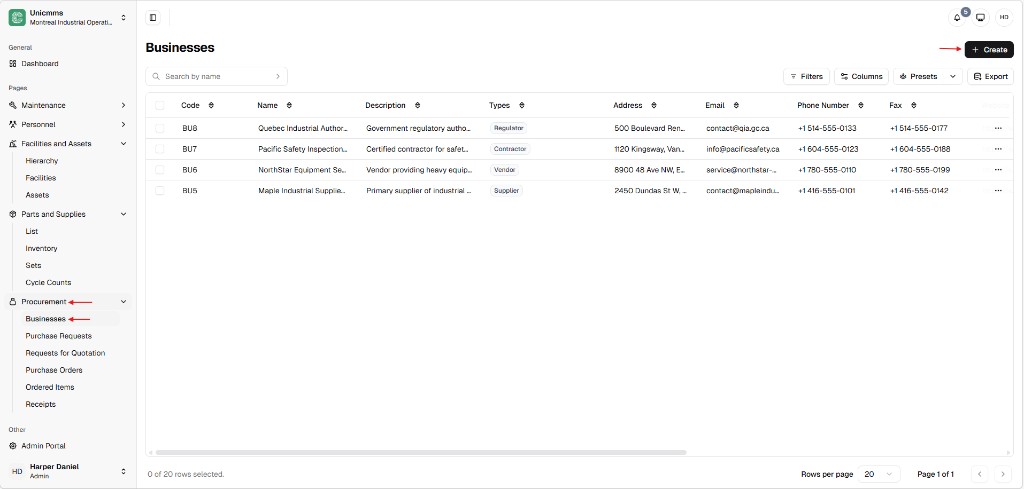
Open the Businesses list
Section titled “Open the Businesses list”- In the main sidebar, expand Procurement.
- Click Businesses.
The Businesses page shows a table with Code, Name, Description, Types, Address, Email, Phone Number, Fax, and a ⋯ (more) menu on each row for later actions. Use Search by name to filter. The toolbar also includes Filters, Columns, Presets, and Export when your product version exposes them.
Open Create Business
Section titled “Open Create Business”- Click + Create in the top-right corner.
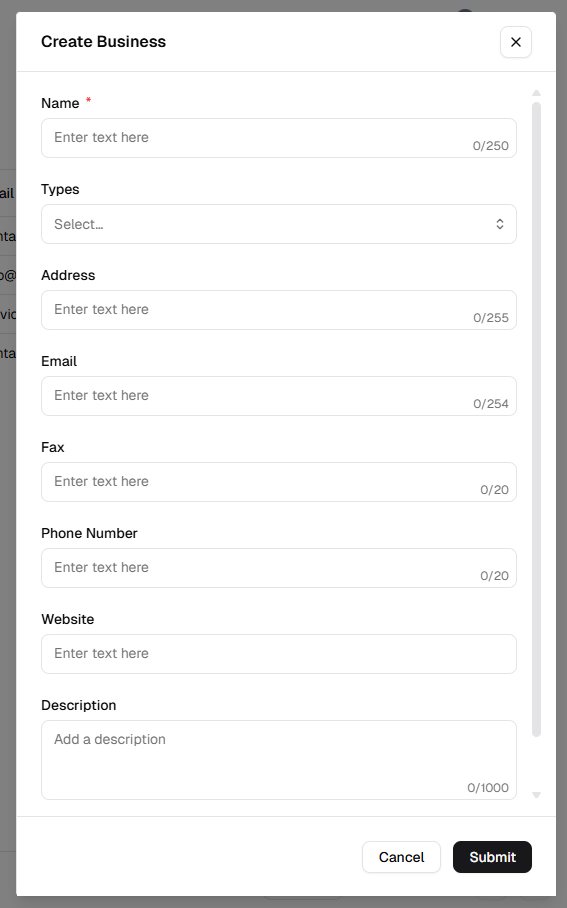
The Create Business dialog opens. Use × in the header or Cancel at the bottom to close without saving. The form can scroll; Name shows a red asterisk as required. Single-line fields use placeholders such as Enter text here and show a character counter (for example 0/250).
Complete the form and save
Section titled “Complete the form and save”- Enter Name * (required).
- Optionally choose Types from the Select… dropdown (for example Supplier, Vendor, Contractor, Regulator).
- Fill any optional contact and profile fields you need.
- Click Submit to save. The new business appears in the list with a Code assigned by the system (for example BU5), consistent with other rows.
Business attributes reference
Section titled “Business attributes reference”| Field | Description | Required? | Limits (typical UI) |
|---|---|---|---|
| Name * | Official legal name of the entity. | Yes | Up to 250 characters. |
| Types | Classification of the partner. | No | Dropdown — Select… then pick one or more types as your product allows. |
| Address | Physical location or headquarters. | No | Up to 255 characters. |
| Primary contact for email and PO delivery. | No | Up to 254 characters. | |
| Fax | Supplemental contact for faxed documentation. | No | Up to 20 characters. |
| Phone number | Direct line for procurement or support. | No | Up to 20 characters. |
| Website | Official URL for the business. | No | Single-line text (placeholder Enter text here). |
| Description | Notes on services or partnership scope. | No | Multiline area, up to 1000 characters (placeholder Add a description). |