
Ce contenu n’est pas encore disponible dans votre langue.
Receipts
Section titled “Receipts”The Receipts module is the formal record of delivery and acceptance of goods or services. It closes the loop between what you ordered on a Purchase Order and what you physically received: when a receipt is finalized (validated / approved—labels vary), UniCMMS uses it to increase inventory, update Ordered Items fulfillment, and advance the PO toward fully received or closed states where rules apply.
Where you work in the product
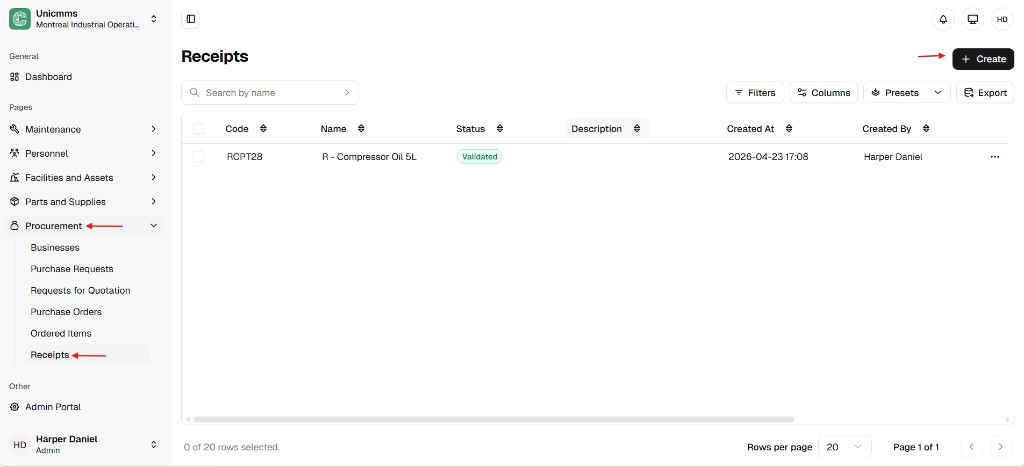
Section titled “Where you work in the product”Open Procurement → Receipts. The list usually includes Code (for example RCPT28), Name, Status (Draft in grey vs Validated in green), Description, Created at, Created by, and row ⋯ actions. Use + Create for a manual receipt, plus Search by name, Filters, Columns, Presets, and Export as needed.
How receipts fit procurement
Section titled “How receipts fit procurement”- Demand is captured on a PO and often exposed as lines under Ordered Items after validation.
- When material arrives, receiving posts a receipt—ideally from Ordered Items (create / add to draft) or manually from this list (How to create a receipt).
- While Draft, you can edit or delete without the same impact as a final record.
- Approve / validate locks the document and triggers stock and fulfillment updates—see Receipt sync, inventory, and delivery rules.
Draft vs finalized (at a glance)
Section titled “Draft vs finalized (at a glance)”| State | Typical meaning | What you can do |
|---|---|---|
| Draft | Work in progress; inventory may not be final yet | Edit, Delete (if allowed), Approve / Validate |
| Validated / Approved | Posted per your rules; audit trail locked | View; Edit / Delete usually not available |
Why accurate receipts matter
Section titled “Why accurate receipts matter”- Inventory accuracy — On-hand should match the shelf; errors affect work orders, reorder logic, and cycle counts.
- Supplier accountability — Quantities and dates are evidence of on-time, in-full delivery (or not).
- Audit readiness — Created / updated metadata shows who touched the record and when.
Recommended path vs manual receipt
Section titled “Recommended path vs manual receipt”The recommended path is Ordered Items so every line ties to open demand—see How to create a receipt from Ordered Items.
Use How to create a receipt (+ Create on this list) when your process allows ad-hoc or standalone receiving.
Receipt records — attribute reference
Section titled “Receipt records — attribute reference”| Attribute | Description |
|---|---|
| Code | System identifier (for example RCPT28). |
| Name | Short title for the receipt (for example R - Compressor Oil 5L). |
| Status | Draft vs Validated / Approved (wording varies). |
| Description | Optional header notes on the receipt. |
| Created at / Created by | When the record was opened and by whom. |
| Updated at / Updated by | Last save on a draft; may stop changing once the receipt is finalized. |
Operational logic — the inventory trigger
Section titled “Operational logic — the inventory trigger”A finalized receipt is not just paperwork—it updates operational data:
- Stock increase — Received quantity per line adds on-hand for that part in the selected stock location (and may affect asset records when lines are asset-based).
- Fulfillment — Ordered Items and the PO move toward fully received when totals satisfy your rules.
- Financial handoff — Finalized receipts often support three-way match and supplier payment (exact process is organizational).