
Tool Types
Section titled “Tool Types”About Tool Types
Section titled “About Tool Types”Tool Types categorize equipment used during maintenance, such as hand tools, power tools, measuring tools, and diagnostic tools. Standardized tool categories improve planning, availability tracking, and reporting across maintenance operations.
Tool Types List (+)
Section titled “Tool Types List (+)”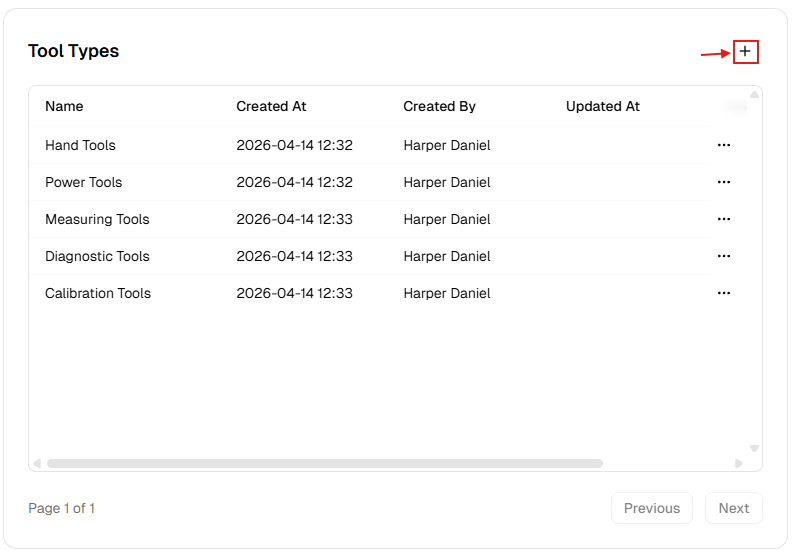
New Tool Type Dialog
Section titled “New Tool Type Dialog”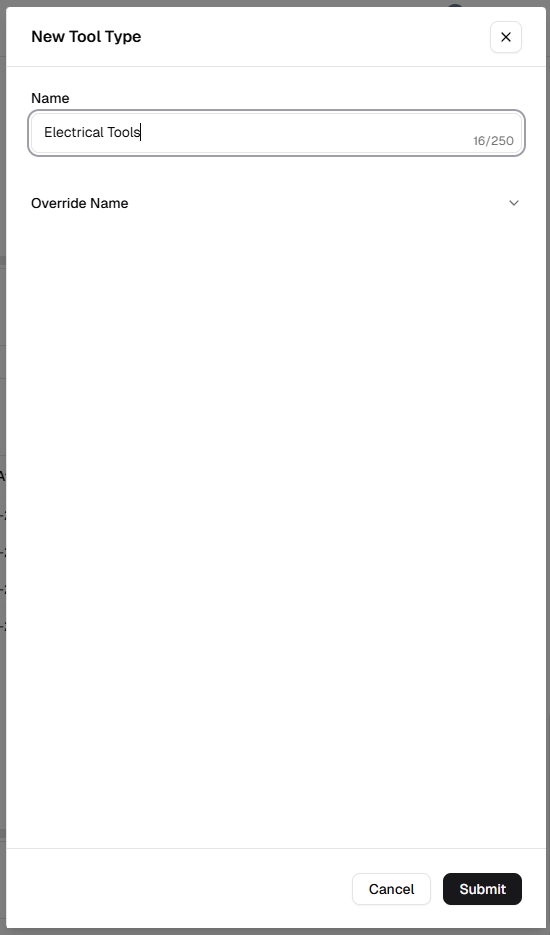
How to manage Tool Types
Section titled “How to manage Tool Types”Add a new tool type
Section titled “Add a new tool type”- Open Admin Portal → Settings → Reference Data.
- Find Tool Types and click +.
- Complete the form:
| Field | Description | Required |
|---|---|---|
| Name | Category (e.g. “Measuring Tools”). | Yes |
| Override Name | Translated label. | No |
- Click Submit.
Update an existing tool type
Section titled “Update an existing tool type”- More (⋯) → Edit.
- Update Name or Override Name.
- Click Update.
Delete a tool type
Section titled “Delete a tool type”- More (⋯) → Delete.
- Safeguard: Deletion is blocked while any tool record uses this type. Reassign tools first.
Verification after changes
Section titled “Verification after changes”After creating, editing, or deleting a tool type:
- Confirm the Tool Types table shows your latest updates.
- Verify naming consistency and avoid near-duplicate categories.
- Open a tool record or related assignment form and confirm updated type options are selectable.