
Derive RFQ (multi-vendor bidding)
Section titled “Derive RFQ (multi-vendor bidding)”A plain Duplicate creates a standalone copy of a record. Derive RFQ is built for procurement: you start from a master Request for Quotation and create another RFQ for a different supplier while keeping a permanent parent–child link in the system.
That link is what makes multi-vendor bidding practical—you compare the same parts and specifications across Businesses without retyping line items for every vendor.
Duplicate vs. Derive RFQ
Section titled “Duplicate vs. Derive RFQ”| Duplicate | Derive RFQ | |
|---|---|---|
| Data entry | Copies data into a new, independent record. | Copies data and targets a new supplier on a linked RFQ. |
| System link | No parent–child relationship. | Records stay related (master ↔ derived). |
| Navigation | Find each RFQ separately in the master list. | Open the master and use Derived RFQs in the summary menu (plus normal list views). |
| Typical use | General copying. | Competitive bidding (same items, different vendors). |
How to use Derive RFQ
Section titled “How to use Derive RFQ”1. Select the base (master) RFQ
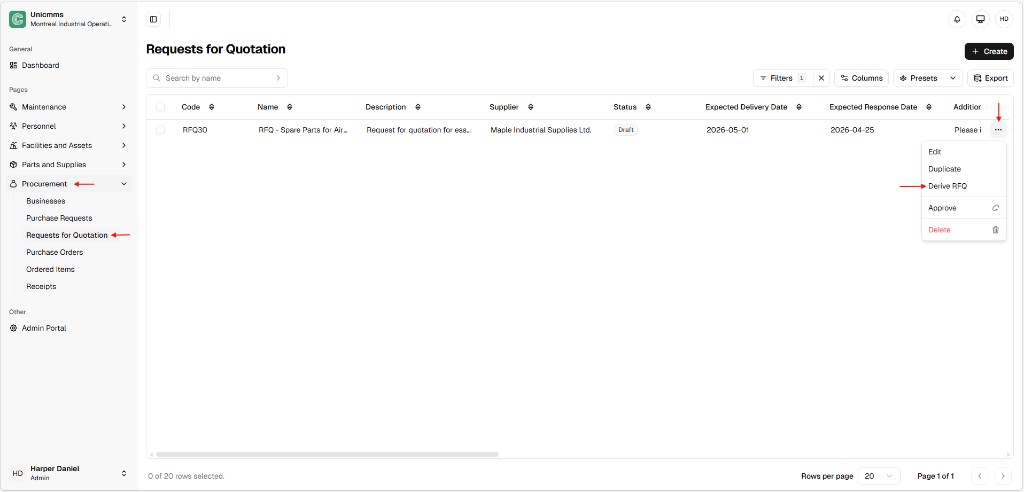
Section titled “1. Select the base (master) RFQ”Open an existing RFQ that already has the products, specifications, and other fields you want to reuse—for example RFQ30.
You can start from:
- The Requests for Quotation list (⋯ → Derive RFQ), or
- The RFQ detail page (Derive RFQ in the top action bar—alongside Edit, Approve, Delete, depending on your role).
2. Run Derive RFQ
Section titled “2. Run Derive RFQ”From the list, click ⋯ on the master row and choose Derive RFQ.
3. Change supplier on the pre-filled form
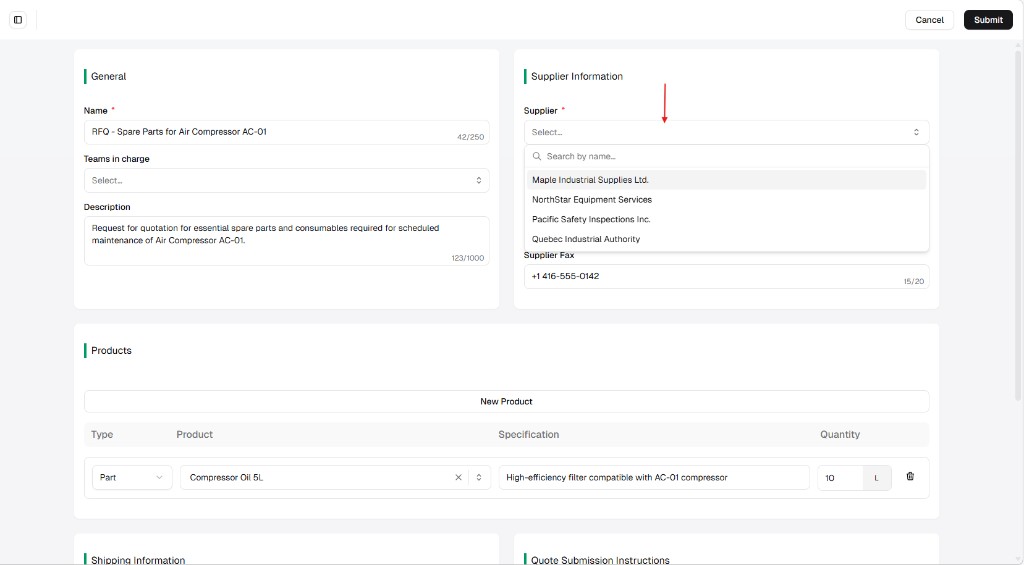
Section titled “3. Change supplier on the pre-filled form”UniCMMS opens the RFQ form with General, Products, shipping, and quote fields largely carried over from the master. Go to Supplier information, open the Supplier dropdown, and pick a different business (for example Quebec Industrial Authority instead of Maple Industrial Supplies Ltd.). Update address / phone / fax if the registry values need tweaks for this bid.
4. Submit
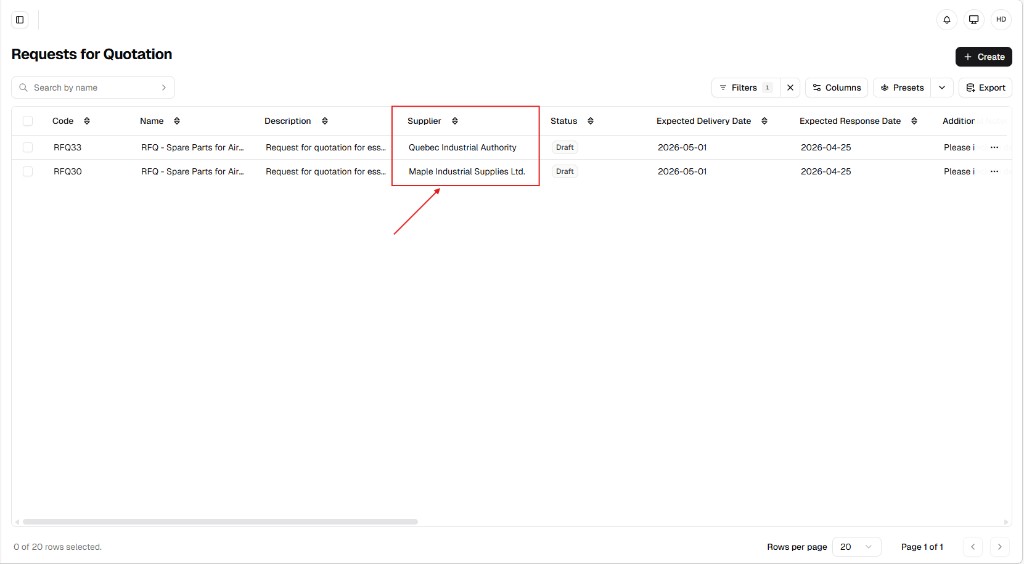
Section titled “4. Submit”Click Submit. The system assigns a new code (for example RFQ33) while keeping the link to the original master (RFQ30).
Navigating related RFQs (Derived RFQs)
Section titled “Navigating related RFQs (Derived RFQs)”A major benefit is tracking the whole bidding package from the master record.
Derived RFQs in the summary menu
Section titled “Derived RFQs in the summary menu”On the detail page of the original RFQ, open Derived RFQs in the left summary menu (next to Summary, Attachments, and similar entries).
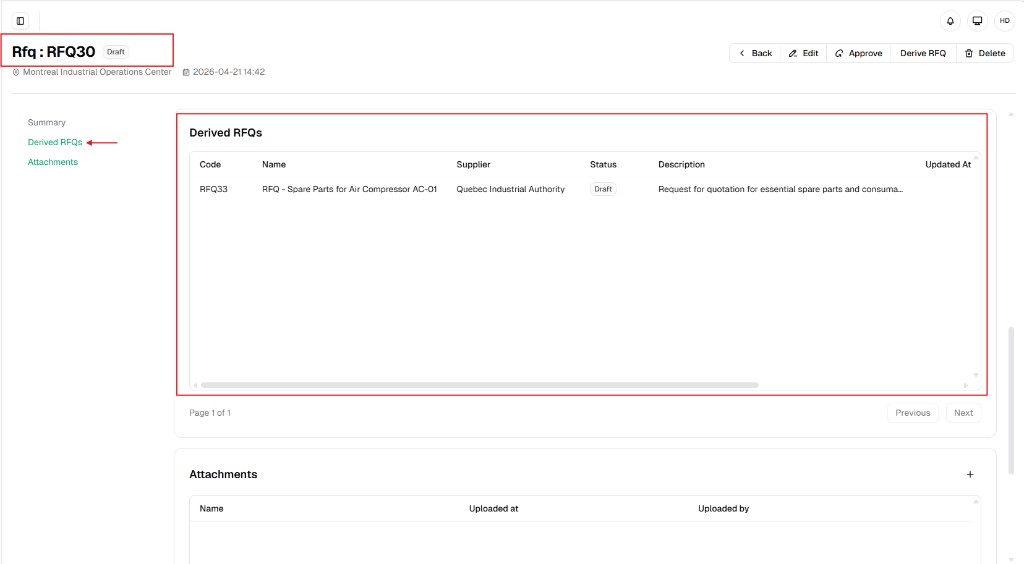
- Consolidated view — One table lists all RFQs derived from this master (Code, Name, Supplier, Status, Description, Updated at, and so on).
- Status tracking — See which supplier packages are still Draft, Approved, Validated, or other states your tenant uses.
- Quick navigation — Click a Code (for example RFQ33) to open that vendor’s RFQ without hunting only from the global list.